We’ve been on a mission to fix friction – the little things that slow you down, interrupt your flow, or just make life harder than it needs to be. Over the past few months, we’ve introduced a series of smart, time-saving improvements to help you work faster and more confidently in Cirrus. We’ve been listening to you, where Cirrus could do more, where things could be simpler, and these updates are the direct result.
But that’s just the beginning.
We’ve also been acting on your feedback in a bigger way. A redesigned marking experience and a fully responsive candidate platform are on the way. These will be rolled out step by step, with zero disruption and plenty of time to get comfortable. We’re involving our customers early in the process to make sure these changes work in practice, not just on paper.
Here’s what’s new, and a look at what’s coming next.
Q1: The little things that make a big difference
There’s a lot to cover, but here are just a few of the most impactful changes we’ve introduced in the past few months:
Question Editor revamp (March)
Let’s start with one of the biggest Q1 improvements: the Question Editor has had a major upgrade. Based on your feedback, we’ve redesigned it to make authoring clearer and more efficient, so it’s easier to write, review and refine your items without unnecessary steps or distractions.
The interface is now easier to navigate, with key updates that streamline your workflow:
- Sticky action buttons that stay visible as you scroll
- A simplified tagging process
- Faster item previews
- Easier access to essential settings
- A cleaner layout for managing alternatives
- An updated rich tech editor for consistent formatting across Cirrus
This revamp reflects what you’ve told us matters most: less clicking around, more time spent on actual content. It currently applies to the Multiple Choice, Multiple Response, Either/Or and
Essay question types, laying the groundwork for broader improvements across all question types in future updates.
Browsing learning objectives (February)
Item authors can now browse Learning Objectives directly in the Tags section when creating or editing items. It’s faster, more accurate, and makes it easier to apply the right objective—whether you’re working across frameworks or adapting to specific standards.
We know the old process could be frustrating to navigate, this update is designed to make it easier and more intuitive. It is especially helpful when managing large objective banks or aligning content to detailed requirements.
Better exam time visibility (February)
You can now see exactly how long each candidate spent on their exam, directly in the Assess tab under Marking. This gives you faster access to critical timing data without switching screens.
Used alongside tools like plagiarism detection and proctoring flags, this update helps you build a clearer picture of candidate behaviour. For example, if someone finishes a two-hour exam in 20 minutes, you can quickly review supporting data and decide whether to investigate further.
You told us that jumping between tools made integrity checks harder than they should be, so we’ve brought the key data together. Having everything in one place saves time and strengthens the integrity of your assessments.
Easier topic assignment for Excel imports (February)
Assigning topics in bulk is now much easier. A new “Topics” column in the Excel export lets you tag items directly in your spreadsheet before importing them into Cirrus.
This change reflects what we heard from users managing large item banks, you needed a quicker, more reliable way to assign topics. Now, you can save time, reduce errors and simplify your workflow, especially when building blueprints or reorganising collections.
More precise financial statement marking (March)
Marking financial statement questions is now more flexible and accurate. You can assess responses at the cell level, awarding partial credit where appropriate, even if other parts of the table are incorrect.
We’ve also improved candidate feedback: submitted answers now appear alongside correct ones in reports, giving candidates a clearer view of what they got right, what went wrong, and why.
These updates were driven by customer feedback and built for real-world use. They support fairer, more detailed evaluation and give candidates more meaningful insight into their performance.
And there’s more
While the highlights above made the biggest impact, we also introduced other smart changes to streamline your workflow and support collaboration. Here are a couple more wins from Q1 that you might have missed:
- You can now lock the order of questions in fixed forms, ensuring every candidate sees them in the same sequence. (March)
- A new filter in Library collections lets you sort questions by original author, making collaboration and content reviews much easier. (January)
These improvements may be small on their own, but together, they reduce friction and lay the groundwork for the bigger changes coming in Q2. Want the full picture? You can find all the details in our release notes.
Q2: What’s next?
We’re just getting started. The next wave of improvements is all about helping you work smarter, from faster authoring to clearer marking and easier rescoring.
Test new features before they launch
We’re always listening to understand what works best for you and right now, we’re looking for a select group of customers to help test upcoming features, including the redesigned Marking Dashboard and Rescoring tools, and the new Candidate Delivery Platform. You’ll get early access, a chance to share feedback directly with our team and a first look at what’s ahead. If you’re interested, please email [email protected] and we’ll be in touch.
And there’s plenty to look forward to
You’ll soon see major upgrades, including AI-assisted content creation, a redesigned marking dashboard, and a streamlined rescoring experience. These updates are built to save you time and give you greater control over your entire assessment process.
Cirrus Assist: AI-powered item authoring
Cirrus Assist is almost here! Built directly into the Library, this AI-powered tool makes item creation faster, easier and more flexible – while you stay in full control. Whether you’re generating new questions, refining existing ones, or pulling content from your own materials, Cirrus Assist is designed to fit your workflow and support high-quality authoring. You decide what to use, what to edit, and what to discard: Cirrus Assist supports your expertise, it doesn’t override it.
With Cirrus Assist, you can:
- Generate items from scratch with guided prompts.
- Extract questions directly from PDFs or Word documents.
- Brainstorm and refine ideas with a responsive AI-powered chat.
- Get instant, AI-generated feedback to enhance your questions.
What’s more, Cirrus Assist is built with data privacy in mind. You can connect your own AI subscription, so your data stays within your chosen environment, secured and managed on your terms.
We’ve been piloting Cirrus Assist with a diverse group of customers, gathering valuable feedback to ensure it delivers the high-quality experience you expect. We’re confident it will be a game-changer for anyone building or refining their item banks. Stay tuned for our tutorials, best practices and tips to help you hit the ground running!
New marking dashboard: See the full picture
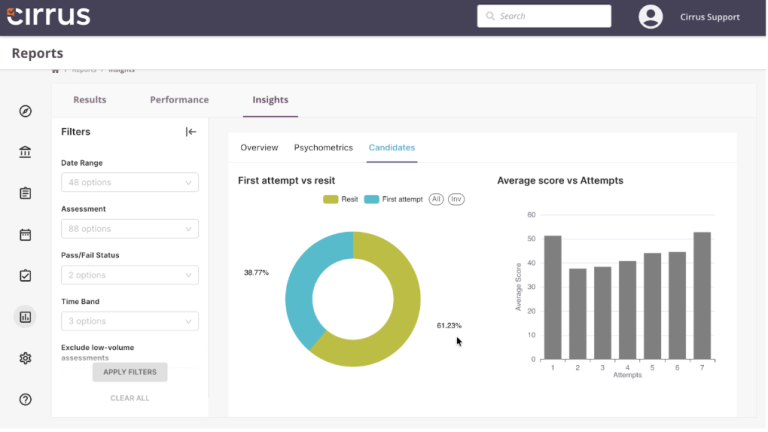
A better way to review results is coming soon. Releasing later in Q2, the redesigned Marking Dashboard will give you instant visibility into candidate performance, helping you spot patterns, flag issues and act faster.
Key updates:
- Score Distribution Graphs: Visualise score patterns across relevant datasets, helping you identify trends and outliers at a glance.
- Performance Metrics: Instantly access data such as total score ranges, pass rates, and reliability metrics.
- Overview Tab for Markers: Provides a quick snapshot of performance data, with direct links to rescoring and question reports for faster, more informed decisions.
No more digging through data. Just clear, focused insights to help you mark smarter and faster.

Enhanced rescoring: Adjust with confidence
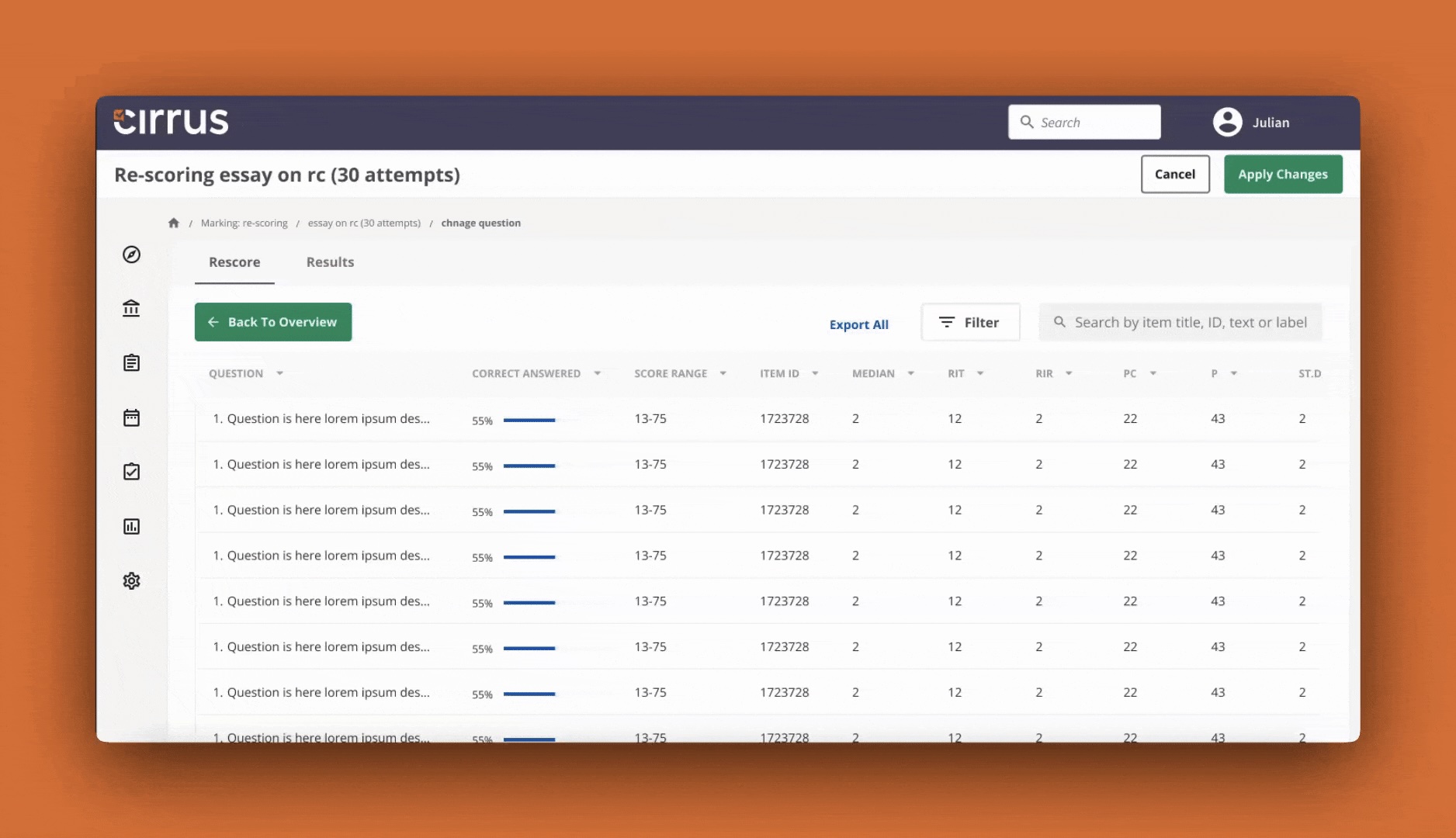
When scores need to be adjusted, speed and accuracy matter. That’s why we’re overhauling the rescoring process to give you more control. Launching later in Q2, the new interface puts everything you need in one place, so you can act quickly, review with confidence, and keep results fair and transparent.
The highlights :
- Integrated Rescoring Tools: You’ll soon be able to access direct links to rescoring and question reports from your main dashboard, eliminating unnecessary navigation.
- Question Performance Table: A dedicated table will show performance data per schedule, with sorting and filtering options for deeper analysis.
- Simplified UI: The rescoring interface is getting a clean, organised redesign that makes applying changes and reviewing metrics easier than ever.
- Live Calculations: Real-time, interval-based calculations will ensure data remains accurate and current, with visible timestamps for transparency.
The redesigned rescoring page will give you a clearer, more efficient way to revisit scores and make adjustments where needed.
Coming soon: A better experience for every candidate
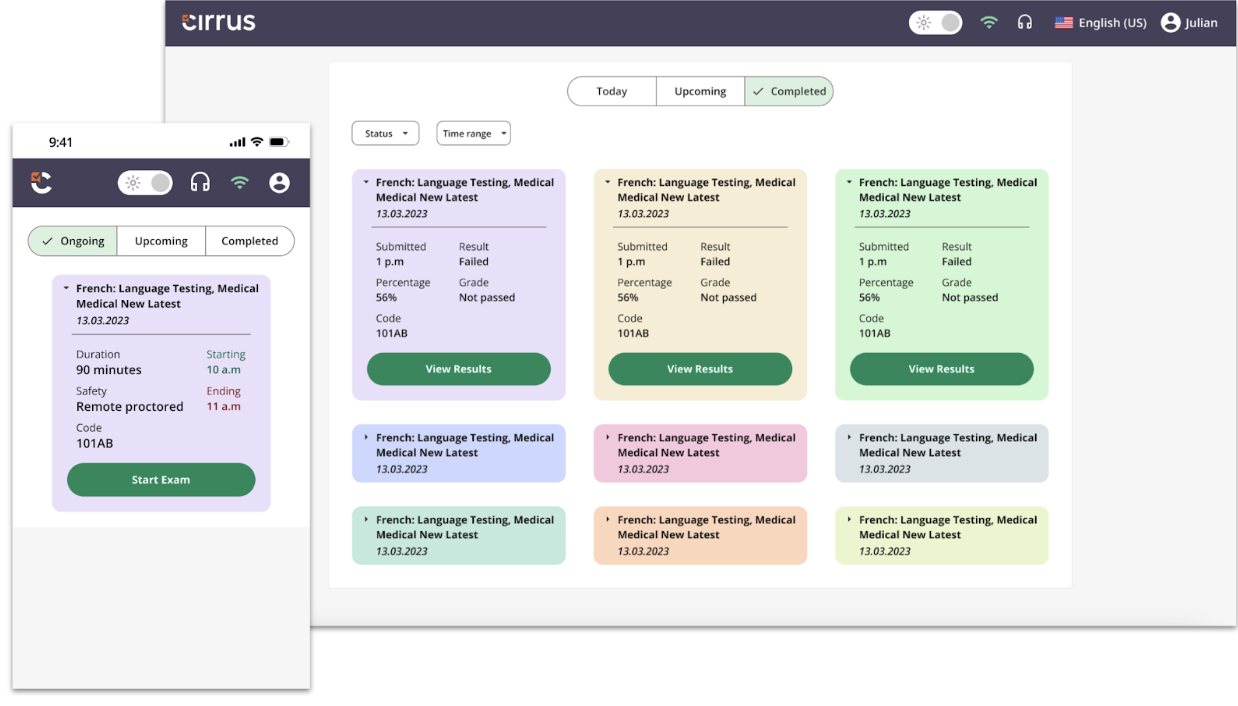
We’re redesigning the Candidate Delivery Platform to take an already intuitive exam experience to the next level. This isn’t just about making the platform responsive, it’s a complete rethinking of how candidates engage with exams, shaped by direct feedback from our customers. You told us clarity, accessibility and flexibility matter more than ever, and we’ve listened.
From enhanced navigation and accessibility tools to a fully offline mode and redesigned score reports, every improvement is built to reduce friction, support focus, and give every candidate the confidence to perform at their best, no matter what device they’re using or where they’re
This is a major upgrade, and like previous ones, it will be rolled out carefully and without disruption. The rollout will be phased, starting with an MVP (Minimum Viable Product) release around July. This means the first version will include the core features necessary for a smooth experience, with further enhancements coming over time. You’ll have the flexibility to choose between the current and new platforms, with plenty of time to prepare before the final switchover.
Cirrus will remain as reliable as ever throughout the process. We’ll share a detailed rollout plan soon, so you’re always one step ahead.
This is the next step in our commitment to delivering a candidate experience that works, every time, everywhere.
We’re here for you
We’re committed to helping you work smarter, reduce stress, and deliver high-quality assessments with confidence.
If you’d like to learn more about any of these updates or see what’s coming in action, reach out to your customer success manager or keep an eye on our newsletter and Knowledge Base for new tutorials and walkthroughs.
As always, your feedback helps us move in the right direction. If you’ve got thoughts to share or you’re curious about getting an early look at what’s next, drop us a line. We’d love to hear from you!