The Cirrus platform is evolving, and we’re excited to introduce our AI Item Authoring tool, ‘Cirrus Assist’, a powerful new feature designed to streamline how you create, refine, and organise assessment items. Built directly into the Library, this AI-powered assistant makes item creation more intuitive, efficient, and dynamic than ever before.
What is AI Item Authoring?
Item Authoring is built right into the Library, where all exam items are stored. It offers a side-panel assistant that helps guide the question-writing process, providing structure, feedback, and useful prompts to make item creation smoother and more intuitive.
Importantly, Cirrus Assist connects with your organisation’s own AI subscription. You’re always in control, your data stays within your environment and is never shared externally.
With AI Item Authoring, you can:
✅ Generate items from scratch using guided prompts.
✅ Extract items from uploaded materials, such as PDFs or Word documents.
✅ Receive AI-generated feedback to enhance question quality.
✅ Use AI-powered chat functionality for brainstorming and refining ideas.
How Does it Work?
The AI Assistant is seamlessly integrated into the side panel, offering three core functionalities:
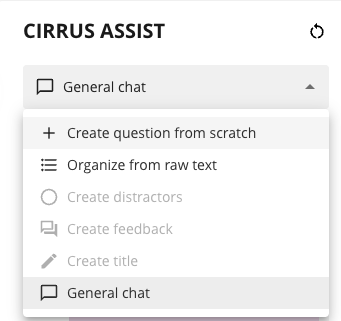
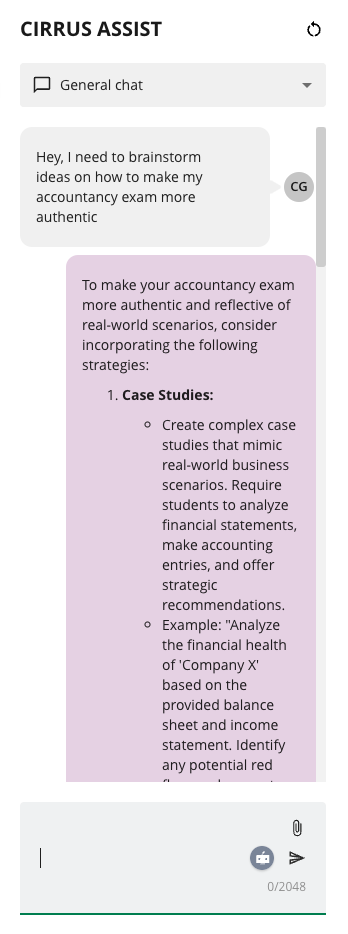
General Chat – A freeform AI chat that allows authors to brainstorm ideas, refine questions, or get best-practice recommendations. There are no restrictions, just open-ended conversations to support creative thinking.
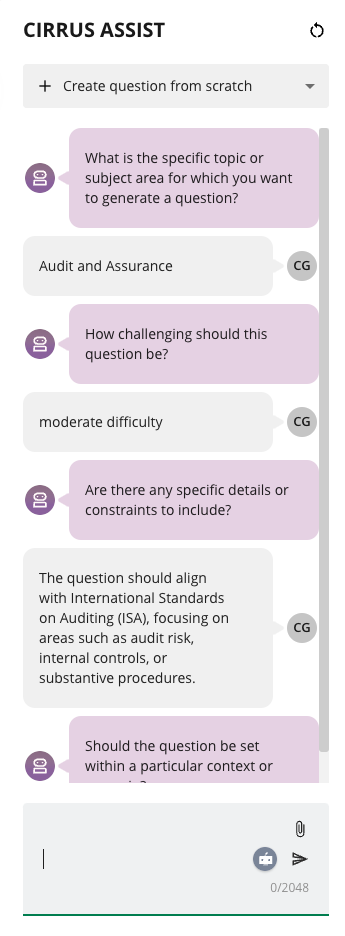
Create an Item from Scratch – A structured, guided approach that walks users through question creation, prompting them to define:
- The subject or topic.
- The difficulty level (using the Angoff scale).
- Specific instructions or contextual elements.
- Answer options and distractors for multiple-choice questions.
- Marking schemes and key points for essay questions.
Organise from Raw Text – A fast-track option where the Cirrus Assist AI extracts potential items from a text block. By uploading PDFs of textbooks, training modules, or any other instructional materials, users can quickly generate draft questions that align directly with what candidates have studied. This ensures that assessments are both relevant and grounded in real learning materials, helping to reinforce knowledge in a meaningful way.
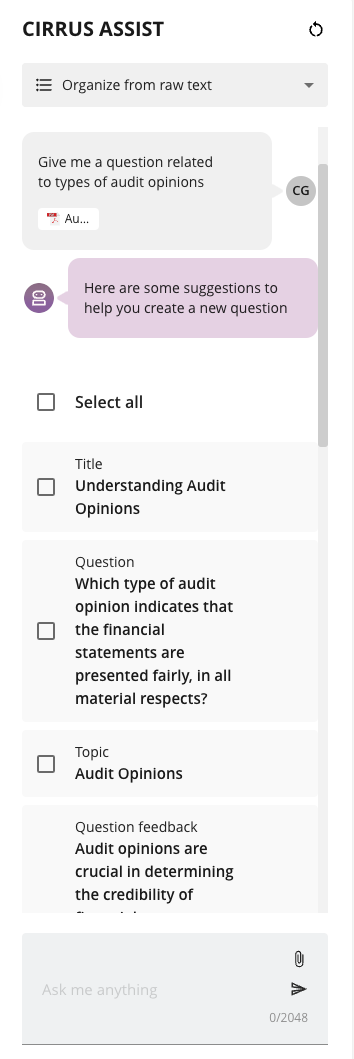
Question Types Supported
AI Item Authoring currently supports:
- Multiple Choice
- Multiple Response
- Either/Or
- Essay (with support for marking schemes and structured responses)
Beyond Item Creation: AI-Powered Feedback
Creating a great question isn’t just about getting the wording right, it’s about making sure your candidates get value from it. That’s why built-in feedback plays such a crucial role in Item Authoring. Not only does Cirrus Assist create items for you, but it auto-generates feedback for your candidates. When they take their exam, they don’t just see which answers were right or wrong, they also receive immediate feedback on their choices:
✅ For incorrect answers, they get an explanation of why the choice was incorrect, helping them learn from their mistakes.
✅ For correct answers, they receive confirmation, along with a brief explanation reinforcing why it was the right choice.
This kind of feedback does more than just grade an assessment, it guides learning. It reassures candidates, gives them confidence in their understanding, and helps them absorb the material more effectively.
Remember, AI is your co-author!
AI authoring is here to assist you. It speeds up question creation, but your expertise is still essential to ensure clarity, fairness, and alignment with learning objectives.
Cirrus Assist is your co-author – it generates ideas and saves time, but it’s all about your final touch:
- Review AI-generated items for accuracy and relevance
- Refine distractors and feedback to enhance learning
- Ensure items align with course content and assessment goals
Since you bring your own AI subscription, you stay in control of your data. To get the most out of Cirrus Assis and ensure your data is secure, we recommend reviewing your setup and setting the right privacy controls. Our team is here to help you configure everything securely and in line with your policies.
Why This Matters
With Item Authoring in Cirrus, creating high-quality assessments has never been easier. Whether you’re crafting new questions from scratch or refining an existing item bank, this tool helps you work faster and more efficiently, without losing the human touch. It guides you through the process, offering structure and support so that every item you create is clear, relevant, and truly useful for learners.
What’s Next?
This is just the beginning! As we gather feedback from users, we’ll continue refining the experience, enhancing guidance, improving feedback, and making question creation even more intuitive.
Stay tuned for more content! We will explore best practices, tutorials, and much more!
Ready to get started? Cirrus Assist is an optional add-on, if you’d like to start using it, just reach out and we’ll help you get set up.
Excited to try it out? If you’re not yet using Cirrus but want to see how AI can enhance your assessment process, let us show you what’s possible. Request a demo today!
Stay in the loop. Want more updates on AI in assessments? Sign up for our newsletter to get the latest insights, best practices, and product updates straight to your inbox.