
Creating great questions takes time, but what if you had a co-author built right into Cirrus?
Cirrus Assist is our AI-powered item authoring assistant, designed to help you create, refine, and organise exam questions faster, without sacrificing quality. Whether you need to generate a new question, improve an existing one, or pull draft items from your source material, Cirrus Assist is here to help, quietly working in the background while you stay in control.
In this FAQ, we cover everything you need to know to get the most out of Cirrus Assist.
First things first, what question types are supported?
Cirrus Assist is ready to help you create Multiple Choice, Multiple Response, Either/Or, and Essay questions. These are the most widely used formats in our platform and Cirrus Assist is built to handle them with precision. Other question types, like File Upload and Hotspot, aren’t supported yet, but we’re already exploring ways to expand its capabilities. Stay tuned.
What are the 3 features, in a nutshell?
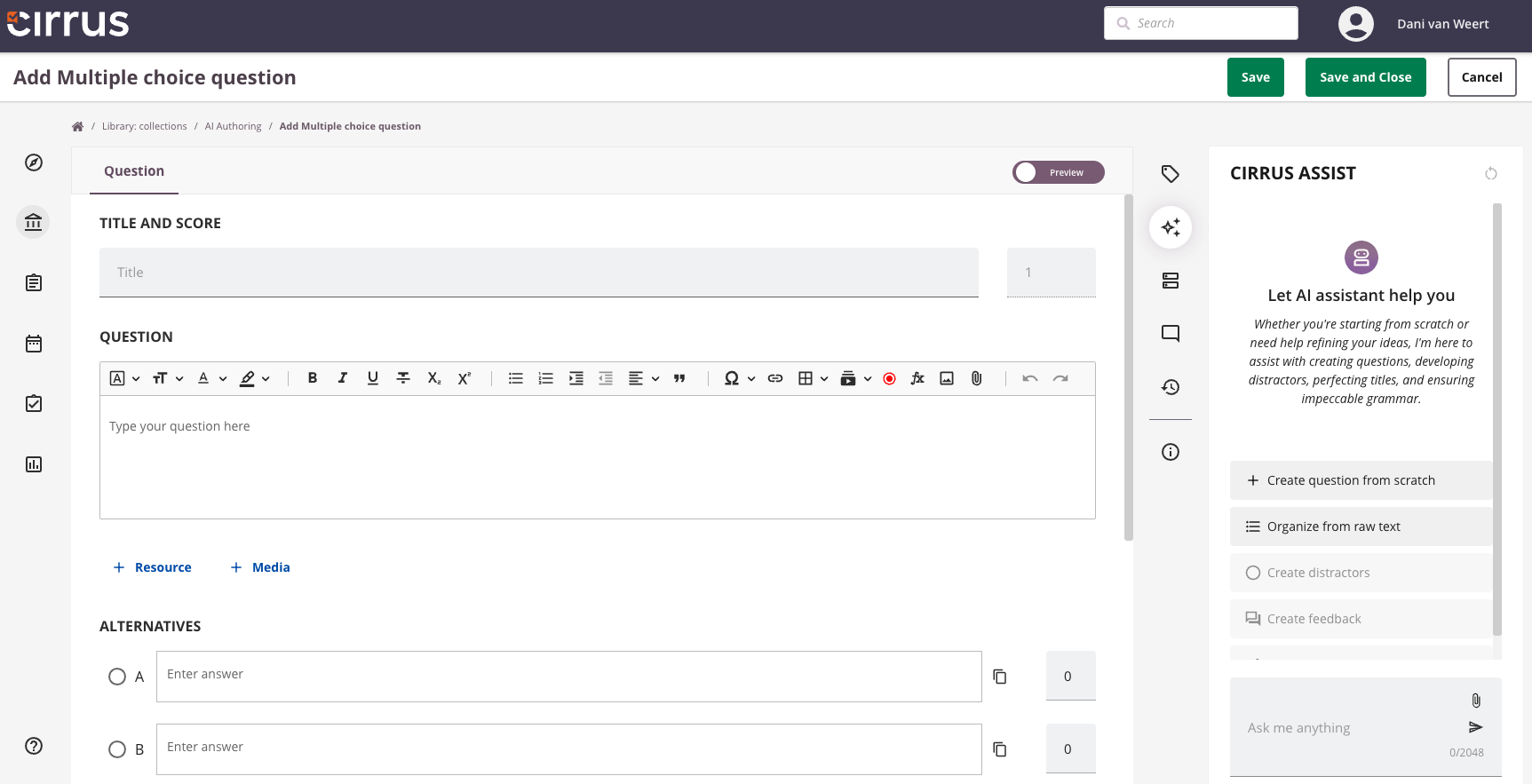
- General Chat is a flexible space where you can explore ideas, rework existing questions, or get instant feedback.
- Create from Scratch walks you through a series of prompts to help you build a complete, well-structured question.
- Organise from Raw Text pulls draft questions directly from your uploaded PDFs or Word documents using just one instruction.
Where can I find Cirrus Assist?
Cirrus Assist lives in the Library – Question Editor. Just create or open any Multiple Choice, Multiple Response, Either/Or, or Essay question, and you’ll find the AI assistant waiting in the right-hand side panel.
Which documents can I upload in ‘Organise from Raw Text’?
You can upload PDF and Word (.doc, .docx) files. Cirrus Assist scans the content and extracts potential questions. You’ll get the best results from documents that are structured and focused, such as course guides, policy documents, or professional training materials.
Can I combine features?
Yes, and that’s where Cirrus Assist really shines. You might start by uploading a document in Organise from Raw Text, then refine the results in General Chat. Or use General Chat to shape your thinking, and switch to Create from Scratch to generate a full, polished item. Each feature supports a different part of your workflow, so you can move between them as needed.
What if I don’t like the AI-generated result?
You can regenerate suggestions, scroll through multiple options, and pick exactly what you want to use. Edits are quick, nothing is added to your item bank until you confirm it, and you’re in control the entire time. Cirrus Assist gives you a head start, not a finished product.
Which AI model does Cirrus Assist use?
By default, Cirrus Assist runs on OpenAI’s GPT model, using your organisation’s own API key. You’ll need to create this key at platform.openai.com and share it with us to get started.
Is the data I input secure?
Yes. When using OpenAI’s API, your data is not used for training unless you opt in. By default, OpenAI retains data for 30 days to monitor for abuse, but you can request zero retention.
We recommend reviewing your OpenAI settings carefully to ensure they match your organisation’s privacy requirements. Your data stays with your provider, not with Cirrus.
Does Cirrus Assist replace human authors?
Not at all. It helps you move faster, generate ideas, and overcome blank-page syndrome, but the quality, clarity, and alignment with your standards still come from you. Cirrus Assist supports your expertise; it doesn’t replace it.
How does Cirrus Assist handle feedback for candidates?
Cirrus Assist doesn’t just help you build great questions, it helps you build better learning. It can automatically generate answer-level feedback that explains both correct and incorrect options. Candidates don’t just see what they got right or wrong, they see why. This makes your assessments more than a measure of performance. It turns them into a learning opportunity.
What are some examples of good prompts?
In General Chat, try asking for help with:
- rewording or simplifying a question
- checking for ambiguity or bias
- adjusting difficulty
- generating plausible distractors
- turning a statement into a multiple-choice or essay question
In Create from Scratch, be clear and specific in your responses, particularly about the topic, context, and difficulty. The more precise your inputs, the better the results.
For Organise from Raw Text, a direct prompt like “Generate multiple-choice questions from this text” works well.
How much time can I expect to save?
Cirrus Assist speeds up the most time-consuming parts of item creation, writing first drafts, tweaking wording, and creating feedback. It helps you produce high-quality questions faster, giving you more time to focus on review, validation, and everything else that matters.
Does Cirrus Assist have limitations?
Yes. Like any AI, its effectiveness depends on the quality of your input.
- Organize from Raw Text is fast but less precise than Create from Scratch, which uses a more structured flow.
- For essay questions, make sure to provide detailed input on answer format, marking scheme, and model responses to get strong results.
Think of Cirrus Assist as a smart shortcut, it boosts your efficiency, but it still needs your expertise to deliver the best outcomes.
Can Cirrus Assist generate multiple questions at once?
Right now, Cirrus Assist is designed for creating one question at a time. This allows you to focus on quality, crafting and refining each item with precision. While it doesn’t support bulk generation just yet, Cirrus Assist still speeds up the process of building a full exam or item bank. We’re exploring ways to expand this in the future to support larger-scale item creation workflows.
Final tip: What’s the best way to get started?
Open the side panel, head to General Chat, and start small. Improve a question, ask for distractors, or try generating something new. Or upload a document and let Organise from Raw Text do the heavy lifting. Cirrus Assist helps you get started fast, and finish with confidence.
Ready to give it a go?
Cirrus Assist won’t replace your judgment or subject expertise, but it will speed up your process, sharpen your output, and help you stay focused on what matters most. Use it to get unstuck, get inspired and get more done in less time.
Cirrus Assist is available as an add-on. If you’d like to explore it, just get in touch and we’ll be happy to activate it for you.


