
Mock exams belong in every high-stakes preparation plan. They help candidates practise in realistic conditions and give educators clear insight into readiness. In Cirrus, mocks are quick to set up and flexible enough to support different teaching styles.
What It Is
Mock exams in Cirrus are practice assessments set up as Formative exams. They mirror the real assessment environment while allowing unlimited attempts and immediate, detailed feedback. Candidates build familiarity with Cirrus and reinforce knowledge through repeated practice.
Perks for Candidates
Confidence with the platform
Candidates can run through the full journey from sign in to submission with the same item types, timing, and breaks they will see on the day. They read the rules up front, see rubrics and sample answers, and know when results come out and how appeals work. Accessibility settings and accommodations are tried in advance, and a quick system check confirms the device, internet, and any proctoring steps. “What if” scenarios are covered so people know how to resume and how support responds. You can also set it up in a way that after the mock, feedback links straight to the right module, chapter or syllabus section, so the candidate knows exactly what to study for the exam. The result is less anxiety, more confidence, and a strong sense that the process is open and fair.
Better time management
Mock conditions train pacing. Students see how long they spend per question and can adjust their approach on the next attempt.
Targeted revision with feedback
Per-question feedback gives candidates more than a score. It explains why the answer is right or wrong and can link straight to the right resource to fix gaps. You can point candidates to a textbook chapter, module, case study, or a timestamped training video so they can review and try again. Think of the mock’s feedback as a custom, bespoke study guide. It shows candidates their weak areas and directs them how to get back on track.
Self-paced practice
Unlimited attempts and open windows let students practise when they are ready. Repetition turns weak areas into strengths.
Perks for Your Organisation
Clear insight into learning gaps
Attempt data shows where candidates struggle. Instructors can target teaching time where it matters most. Feedback can include direct links to the right module, textbook chapter, or curriculum section so candidates know exactly what to revisit.
Stronger item quality
Patterns in results and feedback highlight ambiguous or underperforming items. You can refine content and improve reliability.
Smoother exam days
Fewer surprises for candidates and staff starts with practice. Run a short mock in Cirrus so everyone learns the workflow before it counts. Candidates see the sign-in, tools, and timing in a low-pressure setting. Your admin team can sit the same mock from the candidate view, so they know exactly what people see on exam day. That shared context cuts down last-minute questions and makes support lighter. If something does come up, your team recognises it and fixes it fast because they have already been through the flow. A simple dry run today saves time and stress later.
Higher candidate satisfaction
Candidates can run through the full journey from sign in to submission with the same item types, timing, and breaks they will see on the day. They read the rules up front, see rubrics and sample answers, and know when results come out and how appeals work. Accessibility settings and accommodations are tried in advance, and a quick system check confirms the device, internet and any proctoring steps. “What if” scenarios are covered so people know how to resume and how support responds. The result is less anxiety, more confidence, and a strong sense that the process is open and fair.
How It Works in Cirrus
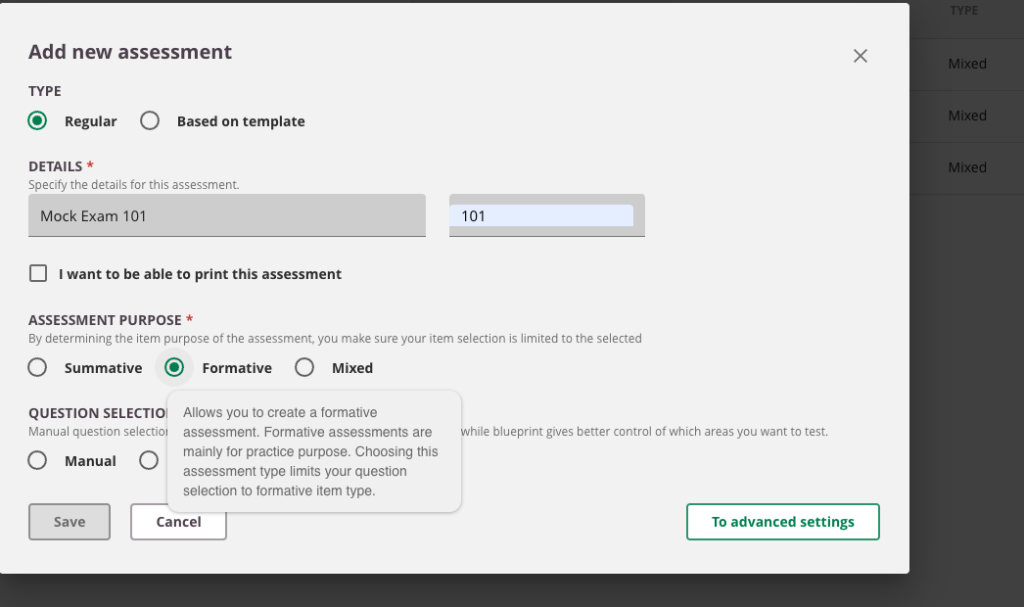
- Create: Assessments → Add new assessment → Purpose Formative → clear candidate-friendly name.
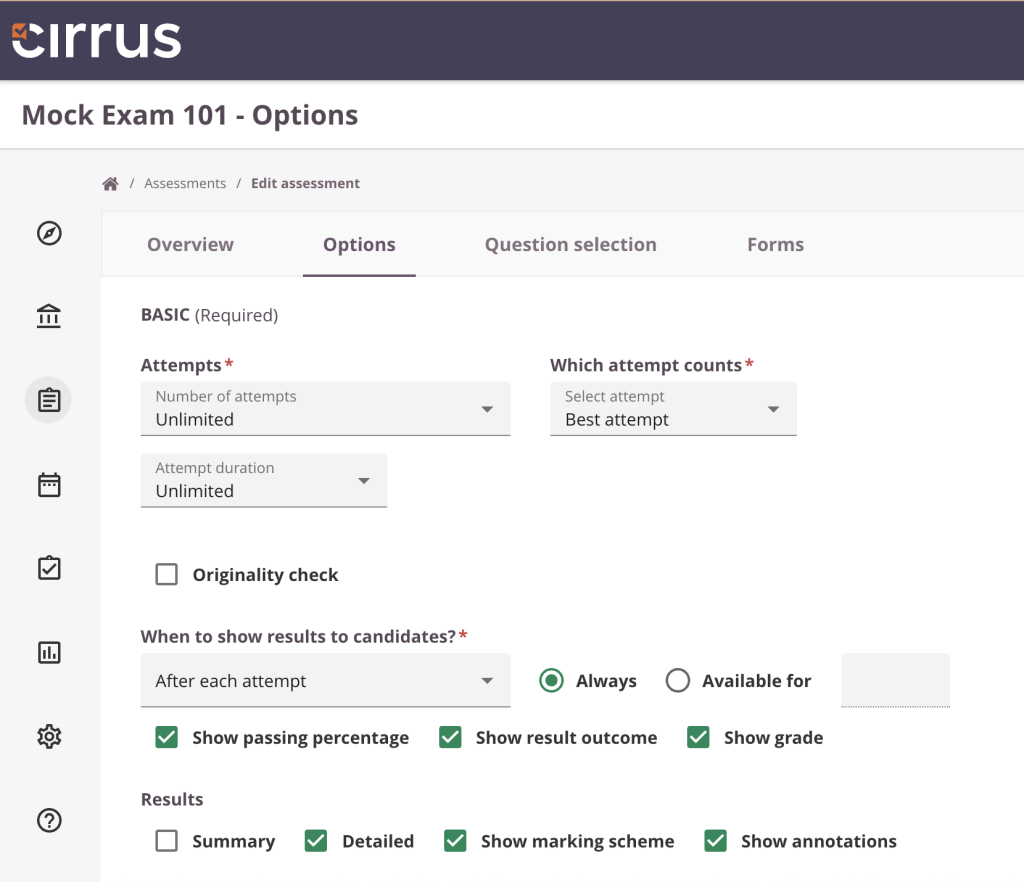
- Attempts & time: Options → Attempts: Unlimited; Duration: Unlimited (true practice).
- Forms: Question selection → add multiple forms or randomise order.
- Results: Results → enable Summary and Detailed; show grade, pass %, outcome per policy.
- Feedback & review: Turn on per-question feedback with resource links; later check Results/Analytics and refine.
Cirrus Top Tips
💡 Introduce mocks early in the course so practice becomes a habit.
💡 Encourage students to keep a short reflection log after each attempt with two focus areas for the next round.
💡 Treat one mock as your internal rehearsal. Walk through candidate, invigilator, and admin flows to confirm settings within your team.
💡 Make feedback detailed and proactive. Tell the candidate exactly what went wrong and why, show the correct approach in simple steps, and add a direct link to a textbook chapter, short video or module to revisit. Finish with one clear next step, like retrying a similar item or a short practice set.