
You spend time crafting fair, clear, and well-structured assessments, but what happens when candidates sit down to take them? Maybe a question didn’t read the way you intended. Perhaps a candidate struggled with navigation, ran into a technical hiccup, or simply felt unprepared. Stress, accessibility issues, and unfamiliarity with the platform can all impact performance, not because of a lack of knowledge, but because of obstacles that could have been avoided.
A great candidate experience isn’t just about the exam content; it’s about the entire journey. Cirrus is designed to support test-takers every step of the way, from intuitive navigation that keeps them on track to accessibility options that ensure fairness for all. Flexible security settings maintain integrity without adding unnecessary stress.
But how do you know if everything is working as intended? That’s where candidate surveys come in. This month’s Hidden Gem explores how this simple yet powerful tool can help you move beyond assumptions and gain real insights into the exam experience.
What are candidate surveys?
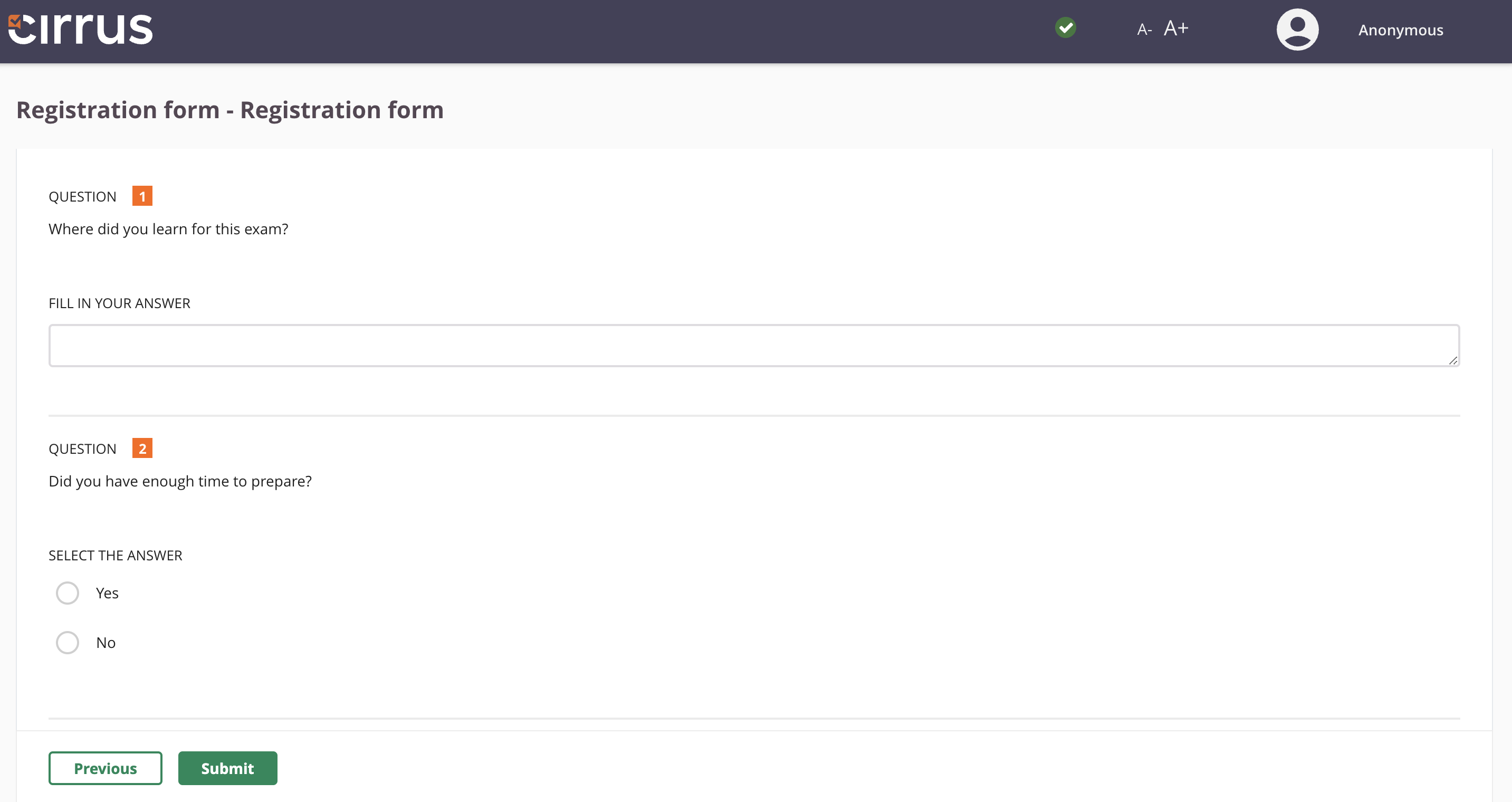
Candidate surveys in Cirrus are built-in registration forms that let you collect valuable insights from test-takers at key moments in the exam process. They can appear before an exam to gather essential details or after the exam to capture feedback on the candidate’s experience. They are fully customisable, so you can design them to fit your specific needs and objectives. Whether your goal is to enhance the candidate experience, improve exam design, or refine your assessment process, surveys give you the data to make informed decisions.
Why use candidate surveys?
Before the exam: Gather essential candidate information
Before test-takers begin their assessment, you may need to collect specific details. Awarding bodies, for example, often require candidates to complete registration forms. These surveys ensure all necessary information is captured upfront, avoiding administrative headaches later. In some cases, exams may also be preceded by a Non-Disclosure Agreement (NDA), and surveys can be used to confirm candidate acknowledgement.
After the exam: Gain valuable feedback
Once the exam is over, surveys allow you to capture insights directly from candidates. Were the instructions clear? Did they feel the difficulty level was fair? Did they experience any technical issues? This kind of feedback helps refine future exams, ensuring they accurately measure what they are meant to assess.
If you’re also involved in training candidates, surveys can provide valuable input on how well they felt prepared. Asking about their learning experience helps you identify areas where your programme or teaching approach could be improved.
The real benefit: Stop guessing, start knowing
Designing a great exam takes time and expertise, but once candidates start their assessments, external factors can influence their experience. Stress, technical issues, or unclear instructions can impact performance in ways you may not anticipate. Without direct feedback, it’s difficult to pinpoint what needs improvement.
Surveys provide the missing link between candidate experience and assessment design. Instead of relying on assumptions, you get real insights into what worked and what didn’t. If candidates repeatedly flag unclear instructions or navigation issues, you’ll know where to focus your improvements. If they consistently report feeling well-prepared, that validates the effectiveness of your training programmes.
How do Candidate Surveys work in Cirrus?
Candidate surveys in Cirrus are built into the platform, making them easy to set up and customise. They function as ‘Registration Forms’ and can be presented to candidates either before or after an exam, depending on the information you want to collect.
For admins, setting up a survey in Cirrus is simple:
- Go to the Admin section – Navigate to Admin > Templates to create a new form template.
- Select ‘Registration Form’ – Click Add and choose this option from the dropdown menu.
- Customise your survey – Enter a title, description, and any welcome or finish text.
- Add your questions – Choose from short text entry, multiple-choice до, and either/or questions.
- Decide when to show the survey – Set it to appear before the exam (for registration details) or after (for feedback).
- Save and apply the survey – Once assigned to an assessment, candidates will see it at the designated stage.
Then, during Assessment Creation:
- Add it to your Form – When building your assessment form, add the Registration Form as an Introduction or Finish Page. NB: You can preview the Registration Form by clicking the ‘eye’ icon.
When a survey is set to appear before the exam, candidates must complete it before they can start their test. If shown after, it appears on the finish page, allowing candidates to provide feedback immediately after completing their assessment.
Only users with the appropriate role and permissions can access survey results. Responses can be exported along with candidate results, allowing exam administrators to analyse performance and feedback side by side. This makes it easier to identify trends, address concerns, and make data-driven improvements.
Learn more about setting up Candidate Surveys/Registration Forms in our Knowledge Base
Best practices for using candidate surveys effectively
A well-designed survey doesn’t just collect data, it drives meaningful improvements in your assessments. To make the most of this feature in Cirrus, consider these best practices:
1. Ask the right questions for meaningful insights
Before creating a survey, think about what information will actually help you improve your exams. Are candidates struggling with instructions? Did they feel the time limits were appropriate? Did they experience any technical issues? Instead of broad or generic questions, focus on specific areas that can lead to actionable improvements.
2. Share key findings with relevant stakeholders
Assessment teams, trainers, and technical support teams can all benefit from candidate feedback. Summarise key insights in a way that makes them actionable, whether it’s refining question wording, adjusting platform guidance or offering more mock exams, or addressing accessibility concerns.
We also encourage you to share anonymised survey results with us at Cirrus, particularly if feedback highlights areas related to platform usability or candidate experience. This helps us continuously improve the system to better meet your needs.
3. Close the feedback loop where possible
If a survey highlights a common issue and you take action, let candidates know. A simple update in candidate-facing materials, such as “Based on feedback, we’ve improved navigation guidance for this exam,” builds trust and encourages continued engagement.
Find out more
If you’re already using Cirrus, you can find step-by-step instructions on setting up Candidate Surveys/Registration Forms in our Knowledge Base. Feel free to reach out to your Customer Success Team if you have any questions.
Not using Cirrus yet? See how our platform helps you create a better exam experience from start to finish. Get in touch today to learn more or request a demo.


